# Responsive HTML email signature(s)
[](https://www.npmjs.com/package/responsive-html-email-signature)
[](/LICENSE)
[](https://github.com/danmindru/responsive-html-email-signature/pulls)
### Let's punch email clients in the stomach 👊
When you need some basic responsive email signatures that work on mobile.
...and your colleagues need them too.
...but you don't want to deal with tables and inline styles.
[Read the docs in other languages](/i18n) ↗️
## Preview
Here are some examples:


## Getting started
- Clone repo `git clone https://github.com/danmindru/responsive-html-email-signature.git`
- Run `npm install`
- Run `gulp` to generate templates from configuration (one time)
### Customizing templates
- Edit files in */templates*
- Run `gulp watch` to watch templates and re-generate when changed
- Open files from `./dist` in your fav browser to check them out
> When you're done, check out [how to add them to your email client of choice](#usage-with-different-email-clients) if in doubt.
## Motivation
Writing HTML emails & email signatures sucks. Let's make it easier. We can't fix all email clients, but we can surely make our lives easier with some automation.
## What does this pile of code do
- [x] generates email templates from your config
- [x] allows generating multiple templates at once (for your colleagues too!)
- [x] transforms linked (``) CSS into inline styles
- [x] embeds local `img[src]` into the template (base64).*
- [x] minifies the template
- [x] ads some basic media queries for mail clients that support them
- [x] can build templates from multiple sources
- [x] watches HTML / CSS files for changes and re-builds
- [x] supports LESS / SASS / PostCSS
- [x] autoprefixer, so you don't have to worry about your `-moz-`s or `-webkit-`s
**Some mail clients don't support them, so an external URL might be a good idea. Also, some clients might complain about the size, so keep an eye out.*
## Docs
### Installing
```bash
$ npm install
$ gulp # By default, HTML & CSS files in './src' will be watched for changes
```
> Note: it's built using node v8.x, so please make sure your node.js version is up to date. Version 6+ should be fine.
### Configuring
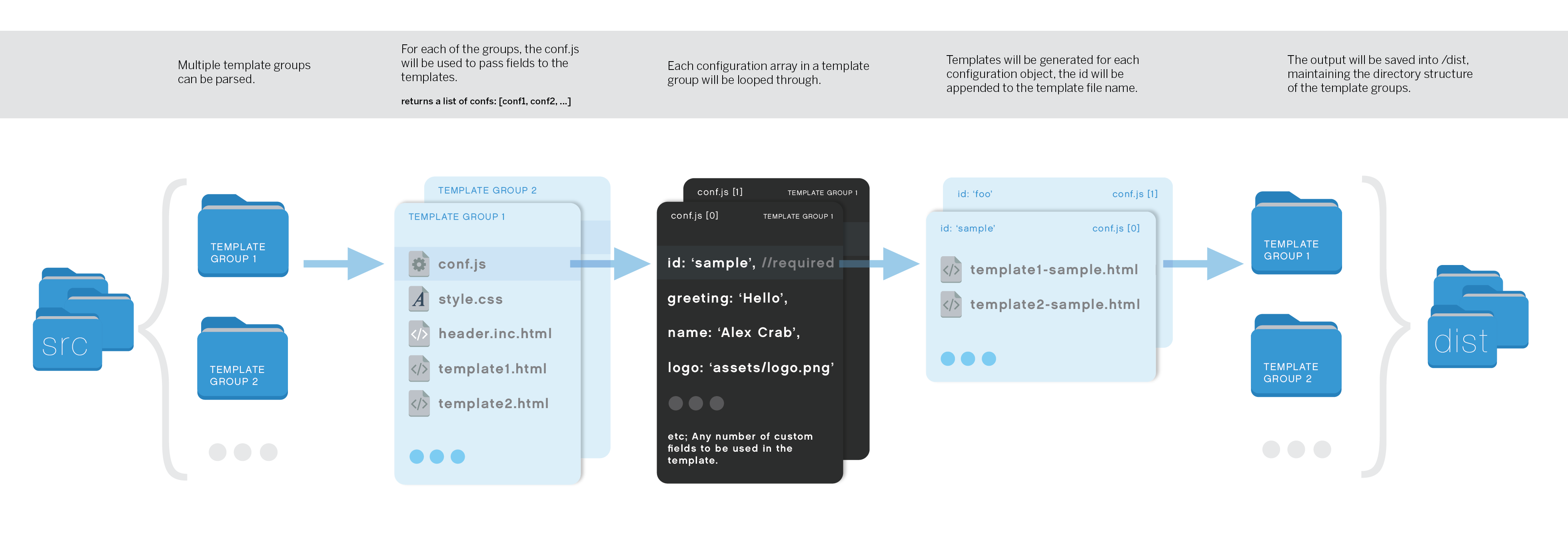
To make a basic email from existing templates, you only have to edit the `conf.json` file in each template.
For example, the dark template accepts the following:
```json
{
"id": "",
"signature": "",
"name": "",
"contactMain": "",
"contactMail": "",
"slogan": "",
"logoUrl": "",
"logoAlt": "",
"website": ""
}
```
### Generating multiple emails from the same config (for your colleagues too!)
Use an array instead of object in `conf.json`, having multiple configs like the one above:
```json
[
{...conf1},
{...conf2}
]
```
### Using config values in HTML
Config variables are made available in all HTML files.
Add any variable to the configuration file and use it in HTML like so:
```html
```
> NB: config variables accept HTML.
### Adding CSS & pre-processing
Any number of CSS, SASS or LESS files in a template directory & they will be automatically processed & inlined into the files outputed in `./dist`.
### Multiple emails in the same template
Templates can contain multiple HTML files from which to build emails. For example, the dark template has `signature.html` and `signature-reply.html`, which is a simpler version.
Each HTML file will be treated as an email template, except for `*.inc.html`. See below ⬇️
### Partials (*.inc.html)
If you indeed have multiple emails in the same templates, you can be sure some of the HTML repeats.
Luckily, partials can be used for common parts (i.e. headers, footers).
Partials *will not* be treated as an email template, but ignored when built. They can however be included in other HTML files, like so:
```html
`conf.js`.
## CSS Support
Remember, it's HTML mails, so you need to check a big-ass table to find out nothing's gonna work.
See [this](https://www.campaignmonitor.com/css/) for more info. [Gulp-inline-css](https://www.npmjs.com/package/gulp-inline-css) is being used to convert whatever CSS you throw at it to inline styles, but it probably won't handle everything.
Some bonuses of using `gulp-inline-css`: many css props will be converted to attributes. For example, the 'background-color' prop will be added as 'bgcolor' attribute to table elements.
For more details take a look at the [inline-css mappings](https://github.com/jonkemp/inline-css/blob/master/lib/setTableAttrs.js).
## Usage with different email clients
### Thunderbird
There are several Thunderbird plugins which can automatically insert signatures when composing e-mails. We recommend [SmartTemplate4](https://addons.mozilla.org/en-us/thunderbird/addon/smarttemplate4) as one of the options. It can use different templates for new e-mails, replies and forwarded e-mails.
### Apple Mail / OS X (oh boy)
#### Solution 1
- Open Mail.app and go to `Mail` -> `Preferences` -> `Signatures`
- Create a new signature and write some placeholder text (doesn't matter what it is, but you have to identify it later).
- Close Mail.app.
- Open terminal, then open the signature files using TextEdit (might be different for iCloud drive check the article below).
```
$ open -a TextEdit ~/Library/Mobile\ Documents/com~apple~mail/Data/V3/MailData/Signatures/ubiquitous_*.mailsignature
```
- Keep the file with the placeholder open, close the other ones.
- Replace the `...` and it's contents with the template of your choice. *Don't remove the meta information at the top!*
- Open Mail.app and compose a new mail. Select the signature from the list to test it out.
**NB**: Images won't appear in the signature preview, but will work fine when you compose a message.
#### Solution 2
You can also open the HTML files in `/dist` in a browser, CMD + A, CMD + C and then paste into the signature box. This won't copy the `` part or the `